Puppet and Chef Integrations
This page is for administrators who use Puppet or Chef alongside Device42. It covers two separate integrations: synchronization scripts that populate the Device42 asset inventory from Puppet or Chef node data, and a Puppet External Node Classifier (ENC) that serves Puppet classes from Device42 to your nodes.
Puppet is a free configuration management utility created by Puppet Labs that helps sysadmins automate configuration and management of machines and the software running on them throughout the enterprise IT infrastructure.
Device42’s integration connector for Puppet allows Device42 software to utilize discovered system information data stored in Puppet manifests to populate the Device42 asset inventory, eliminating the need to run redundant auto-discovery processes across the IT infrastructure.
Prerequisites
Before setting up either integration, make sure you have:
- The IP address of your Device42 appliance, and a Device42 username and password for the scripts to authenticate with
- The relevant integration script from the Puppet and Chef Integrations section below
The Puppet ENC integration also requires:
- Puppet v4.8 or later
- Puppet Server v2.7.2 or later
- Python 2.7.10 or a later Python 2.7 release. The ENC script is not compatible with Python 3.
- Access to your Puppet master to place the script and edit
puppet.conf
The Puppet node synchronization script also requires:
python-develinstalled, and the packages in the script'srequirements.txt- A client certificate signed on the Puppet server, along with its private key, and optionally the CA certificate
- Permission for the client to reach the Puppet certificate and node API endpoints
The Chef synchronization script also requires:
- The
pychefPython package - A Chef client name and its key file, to connect to the Chef server
- An
organizationvalue, for Chef Server 12 and later
Puppet ENC (External Node Classifier) Integration
External Node Classifiers accept the name of a node as input and return the class hierarchy for that node as output. Device42 can act as a Puppet ENC, allowing you to manage Puppet classes directly from Device42 instead of managing node definitions in the main site manifest (site.pp) on your Puppet master.
An ENC script pipes data between your Puppet master and an ENC source, which is Device42 in this case.
Setting up the Device42-Puppet ENC integration is a four-step process:
- Create a JSON custom field in Device42, named whatever you like.
- Fill the custom field you created in step 1 with your desired environment, in JSON.
- Download and configure the Device42-Puppet ENC integration script.
- Configure your Puppet master to use Device42 as an ENC.
Set Up the Puppet ENC Integration
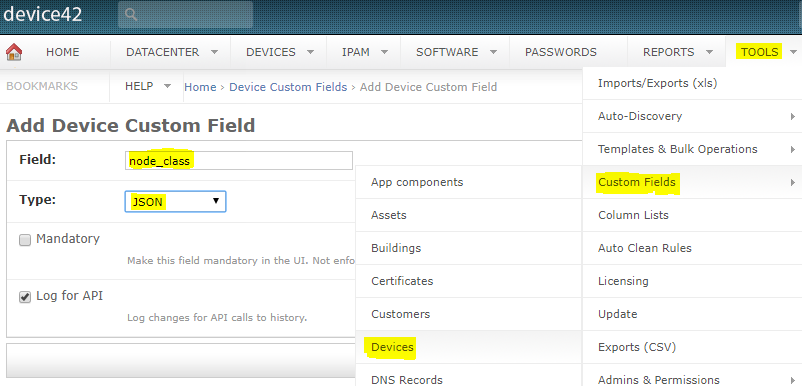
- Navigate to Tools > Custom > Device Fields in Device42, and click Add Device Custom Field. Set Type to JSON. This example calls the field
node_classes.
- Populate the
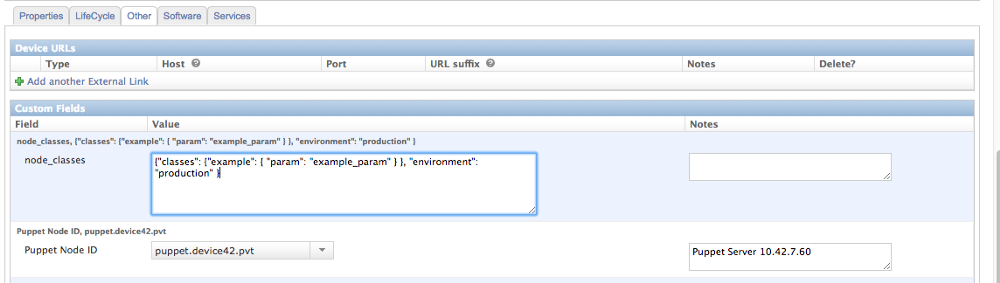
node_classesfield with a placeholder on your target Puppet node's object in Device42. This example usespuppet.device42.pvt. Set thenode_classesfield to the following:
Click to expand the code block
{
  "classes": {
    "example": {
      "param": "example_param"
    }
  },
  "environment": "production"
}
- Download the script and set it up:
- Clone the
d42-puppet-encrepository onto your Puppet master. - Make the script executable with
chmod +x {filename}. - If you do not have the requirements in
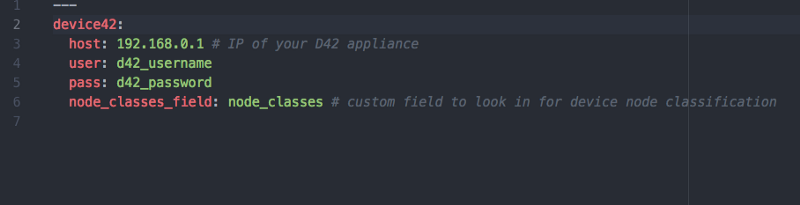
requirements.txtinstalled, install them withpip install -r requirements.txt. - Configure the
settings.yamlfile. It requires:- The IP address of your Device42 appliance
- The username and password for your Device42 appliance
- The name of the custom field created earlier,
node_classes
- Clone the
- Designate your Puppet master as the ENC authority by editing
/etc/puppetlabs/puppet/puppet.conf. Add these two configuration lines, specifying the location ofd42_enc_fetcher.py:
[master]
  node_terminus = exec
  external_nodes = /etc/puppetlabs/puppet/d42-puppet-enc/d42_enc_fetcher.py
Step 5: Restart your Puppet server services. The integration is now active.
Once that is set, restart your Puppet server services. You can now create a class.
Chef Integration
Device42 also provides an integration connector for Chef, which streamlines the task of provisioning, configuring, and maintaining servers.
The Device42-Chef integration lets Device42 use Chef-discovered system information to populate the Device42 asset inventory, which removes the need to run redundant discovery processes.
Device42’s Additional IT Infrastructure Capabilities
Integrating Puppet or Chef with Device42 also keeps Device42 aligned with your Puppet or Chef device data. This gives you consistency between Device42 and either application across the following Device42 capabilities:
- IP address management
- Cabling management
- Password management
- Server room, rack, and device visualizations
- Software license management
- Power and environmental monitoring
- Power control
Integration Scripts
The following GitHub repositories contain the scripts for syncing data between Device42 and Puppet or Chef:
- Puppet: github.com/device42/puppet_to_device42_sync_py — sync Puppet node information to Device42
- Puppet ENC: github.com/device42/d42-puppet-enc — use Device42 as a Puppet External Node Classifier
- Chef: github.com/device42/chef_to_device42_sync_py — sync Chef node information to Device42